
Newline Mobile Apps
Applications on Android, iOS, macOS and Windows — not all competitors ship for every platform. We tested feature parity with the browser, walked through the install process on each platform and checked whether the 200 Points install bonus is actually worth the effort. Here's what we found.
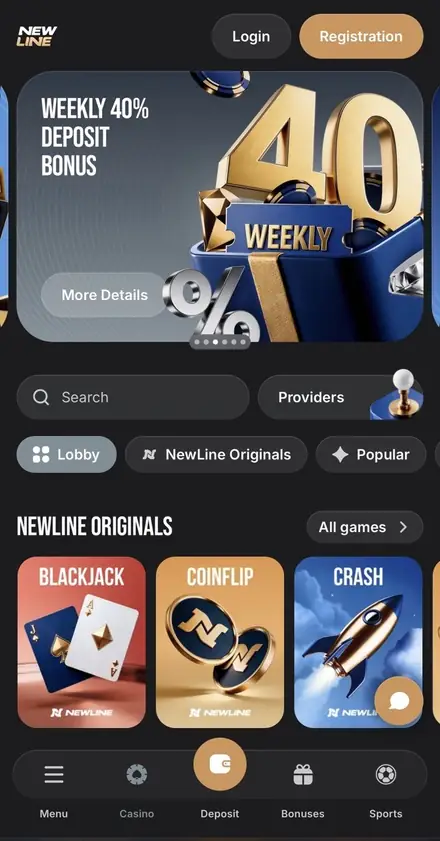
App quality is one of those quiet differentiators that doesn't show up on a casino comparison spreadsheet — until you actually use one for a week. Most casinos at Newline's market level ship a PWA on iOS: a Safari shortcut on the home screen, effectively the same as the browser version with a different icon. Newline takes a broader approach: apps on four platforms, all distributed direct from the website rather than via Google Play or the App Store. This review tests how that actually plays out — feature parity, install friction, performance, and the security trade-offs of going outside the official app stores.
Quick install bonus economics
Install the app for 200 Newline Points. Enable notifications for another 100. That's 300 Points in your loyalty balance — 25% of the 1,200 Points you need to exchange to 1,000 INR. No deposit required.
Install & ClaimBottom Line First
Apps across all major platforms — solid and consistent
All four apps are full ports of the platform rather than stripped-down web wrappers. The Android APK is the most native feel; the iOS, macOS and Windows versions are PWA installs. The headline gaps are the same as the desktop platform: no two-factor authentication. If that doesn't change your decision, the apps are a clear upgrade over the plain browser experience.
Newline App - Per-Platform Scores
The four apps don't all score the same. The browser-version baseline is similar across all of them, but the install process and the platform-specific niceties vary.
Android App
8.5/10Verdict: Strong full-featured APK download. Install requires allowing "unknown sources" once because of direct distribution. Once installed it behaves like any other Android app — home-screen icon, push notifications, full-screen experience, automatic session persistence. Tested on phones and tablets; phones are the better-tuned experience.
iOS App (iPhone & iPad)
9.0/10Verdict: Full-featured PWA for iOS. Newline's iOS app installs as a home-screen shortcut via Safari — the standard approach in this segment given App Store restrictions on gambling apps. The install flow is straightforward on modern iOS, and the result behaves like an app: full-screen, push notifications, one-tap launch from the home screen. Works on iPad too, with some layouts that look thin on a large screen.
macOS App
8.0/10Verdict: A macOS PWA that adds Newline to your Dock via Safari and opens in a focused window — no browser tabs, no URL bar. Listed separately from the mobile apps in the website footer. Best for Mac users who play often enough to want a dedicated launch shortcut.
Windows App
—Verdict: Available as a PWA through the official Newline website. When visiting the site on Windows, the browser offers an option to install Newline as a standalone app. Opens in a focused window, pins to the taskbar, and works the same as the browser version. No install bonus is currently attached to the Windows install — the 200 Points bonus is tied to the Android and iOS apps.
Feature Parity Newline App vs Browser
One of the easiest ways for an operator to cut corners on a mobile app is to ship a reduced game library — fewer slot titles, no live dealer, no esports markets. Newline doesn't. The apps are a complete port of the platform.
| Feature | Browser | Mobile App | macOS App |
|---|---|---|---|
| Casino lobby (85+ providers) | Yes | Yes | Yes |
| 11 Newline Originals games | Yes | Yes | Yes |
| Live casino tables | Yes | Yes | Yes |
| Sportsbook (prematch + live) | Yes | Yes | Yes |
| Esports markets (9+ disciplines) | Yes | Yes | Yes |
| Wheel of Fortune mini-game | Yes | Yes | Yes |
| Welcome bonus + cashback + reload | Yes | Yes | Yes |
| Newline Points balance & exchange | Yes | Yes | Yes |
| Cashier (deposits + withdrawals) | Yes | Yes | Yes |
| 24/7 live chat support | Yes | Yes | Yes |
| Push notifications | No | Yes — earns 100 Points | Yes |
| 200 Points install bonus | No | Yes — one-time (Android/iOS) | No |
| Two-factor authentication | Not available | Not available | Not available |
| Biometric login (Face ID, fingerprint) | — | Not available | Not available |
The two app-only advantages are push notifications and the install bonus. Push notifications matter more than they sound: enabling them unlocks visibility of exclusive deposit offers and occasional no-deposit bonuses that aren't shown to non-subscribed users.
Install Process of Newline App
Direct distribution outside Google Play and the App Store is the standard practice for online casino apps, but the install flow looks different on each platform. Here's the practical reality of each one.
Android Install
Open Newline on your Android browser
Confirm the URL is the official Newline domain — that's the single most important security step. Avoid links from unsolicited messages or sponsored ads.
Find the install card in the footer
Scroll to the orange "200 Points for installing the app" card. The card is labelled "Available for Android and iOS" and has a single white Install button.
Allow installations from the browser
Android may prompt for permission to install from "unknown sources" or from your specific browser. Approve — this is required for direct APK distribution and is per-browser, so you can disable it again afterwards.
Complete install and log in
Tap through the standard Android install confirmation. The Newline icon appears on your home screen. Open it, log in with the same email and password as the browser, and the 200 Points bonus is credited automatically.
iOS Install
Open Newline in Safari
Safari is the recommended browser on iOS for the install flow. Confirm you're on the official Newline URL.
Tap Install in the footer card
Same orange "200 Points for installing the app" card. The Install button starts the iOS install flow.
Approve the iOS confirmations
iOS will show one or two confirmation prompts during the installation process. Approve them. The exact wording depends on your iOS version — follow the on-screen instructions.
Launch from the home screen and log in
The Newline app icon appears on your home screen. Tap it, log in with your credentials, and the install bonus lands in your loyalty balance.
macOS Install
Open Newline in Safari on your Mac
Visit the official Newline URL in Safari. This is the supported browser for the macOS PWA install.
Click the Share icon in the address bar
In Safari on macOS, the Share button is in the address bar.
Select "Add to Dock"
Choose this option from the Share menu.
Click "Add" and log in
Newline appears in your Dock and opens in a focused window without browser tabs. Sign in with your usual credentials — balance, bonuses and Points are already there waiting.
Windows Install
Open Newline in your browser on Windows
Confirm the URL is the official Newline domain.
Look for the install prompt
When visiting the site, the browser may show an option to install Newline as an app. Alternatively, use the browser's menu to install the site as an app (available in Chrome, Edge and other Chromium-based browsers).
Confirm the install
The app installs as a standalone window and can be pinned to the taskbar.
Launch and log in
Open the Newline app from the taskbar or Start menu and log in with your usual credentials.
Security Trade-offs of Going Outside the App Stores
Direct distribution is the standard for online casino apps, and there are good reasons for it: Google and Apple both restrict gambling apps in many regions including India, so most casinos cannot reach Indian players via the official stores even when they want to. The trade-off is that the curation and basic malware screening that app stores provide are absent.
Two practical security rules when installing direct apps:
- Confirm the source URL. Always download from the official Newline domain — typed directly into your browser or accessed from a bookmark you set yourself. Avoid links from unsolicited SMS, social-media DMs, sponsored search ads, or third-party "APK download" aggregators. Those are the most common vectors for fake builds.
- Disable "unknown sources" permission after installing. Once Android has installed the Newline app, you can disable the permission in your browser's settings. It's per-browser and per-app, so disabling it later doesn't affect the already-installed Newline app.
And one structural security gap to know about regardless of platform: Newline does not currently offer two-factor authentication, biometric login or hardware-key support on any version. The same gap exists on the desktop browser. Your password and the security of your registered email address are your only protection — use a long unique password and protect the email account it's tied to.
Pros and Cons Newline App
Why Install
The reasons the apps are worth claiming the install bonus for.
- One-time +200 Newline Points — never again from the browser
- Push notifications unlock exclusive offers (and earn another 100 Points)
- One-tap launch — no URL bar, no browser tabs, no clutter
- Apps available for Android, iOS, macOS and Windows
- Full feature parity with the desktop platform
- Same login, same balance, same bonuses across all devices
- Works as a focused environment for longer play sessions
Honest Caveats
Things to weigh before installing.
- Apps come from Newline's site, not Google Play / App Store
- You'll need to allow "unknown sources" once on Android
- iOS, macOS and Windows apps are PWA installs rather than native applications
- No two-factor authentication on any version (yet)
- No biometric login — Face ID, Touch ID and fingerprint not supported
- VPN, proxy and TOR strictly prohibited under T&C — applies in apps too
The 200 Newline Points Install Bonus - Worth Doing the Math
The headline promotion attached to the apps is the +200 Newline Points credit on first install. It's a one-time per-account bonus, applied to either the Android or iOS app (not both — you don't get +400 by installing on two devices). Here's what 200 Points actually means in INR.
APP INSTALL ECONOMICS
+200 Points = ~167 INR equivalent
- 1,200 Points exchange to 1,000 INR — that's 1 Point ≈ 0.83 INR
- 200 Points alone ≈ 167 INR but requires reaching the 1,200 minimum threshold first
- Stack with +100 Points for notifications → 300 Points ≈ 250 INR (still below threshold)
- Stack with normal play (1 Point per 750 INR slot turnover) to reach 1,200 quickly
- x1 wagering after exchange — easiest unlock on the platform
- One-time per account — reinstalling the app does not trigger again
Realistically: the 200 Points bonus is genuinely free value but it doesn't reach the 1,200 minimum exchange threshold on its own. To convert it to cash you need to combine it with everyday play that adds the remaining ~1,000 Points, which corresponds to about 750,000 INR of qualifying turnover. For a regular slot player that builds up over a few weeks of normal sessions; for a casual once-in-a-while player it may sit unused.
Frequently Asked Questions about the Newline Apps
Newline's iOS app installs as a PWA — a home-screen shortcut added via Safari rather than a native application from the App Store. This is the standard approach in this segment: App Store policies restrict gambling apps in many regions including India. The install flow is straightforward — open the site in Safari, tap Install from the footer card, approve the prompts, and the icon appears on your home screen.
For most regular players, yes. The app launches with one tap from the home screen, supports push notifications (which unlock no-deposit offers), and includes a one-time 200 Newline Points install bonus. Feature parity with the browser is essentially complete — same casino lobby, same sportsbook, same Originals games and same cashier. The browser version is fine for occasional play; the app is better if you log in more than once a week.
The Android app is distributed directly from Newline's website rather than Google Play because Google's policies restrict gambling apps in many regions including India. Direct distribution is standard practice across the online casino industry. The single most important rule: confirm you are on the official Newline domain before downloading. Avoid links from unsolicited messages, sponsored search ads or third-party APK aggregators — those are common vectors for fake builds.
Yes. Newline offers a Windows PWA that can be installed from the official site via any Chromium-based browser. It opens in a standalone window and can be pinned to the taskbar. Note that the 200 Points install bonus is tied to the Android and iOS apps, so the Windows install does not earn the bonus.
Yes — two specifically. App users receive a one-time 200 Newline Points bonus for installing either the Android or iOS app, and an additional 100 Points for enabling push notifications when the popup appears. Notifications also unlock access to exclusive deposit offers and occasional no-deposit bonuses that aren't visible to non-subscribed users. Beyond those, the welcome pack, cashback, weekly 40%, weekend FS and express boost are identical between app and browser.
No. Your account data — balance, bonuses, Newline Points, bet history — lives on Newline's servers, not on your device. Uninstall and reinstall the app on the same or a different device, log in with the same email and password, and everything is exactly where you left it. The 200 Points install bonus is one-time per account, so reinstalling does not trigger it again.
Yes. The iOS app installs on iPad as well as iPhone, and the Android app runs on Android tablets. The interface scales to the larger screen size, although the app was clearly designed phone-first — some sportsbook layouts can feel underutilised on a 13-inch iPad. If you mainly play on a tablet, the browser version often offers a better-tuned layout than the app does.
Initial install size is moderate — typically under 100 MB on Android and similar on iOS — much smaller than a console-style game, comparable to a banking app. Most game content streams from Newline's servers rather than installing locally, so storage growth over time is minimal. Data usage scales with the type of content: live dealer streaming uses noticeably more bandwidth than slot play, and sports live streaming uses the most. Wi-Fi is recommended for live dealer and sports streaming sessions.
Verdict
The cleanest one-line takeaway: Newline covers all four major platforms — Android, iOS, macOS and Windows — giving players a consistent one-tap experience wherever they play. The Android APK gives the most native feel; the iOS, macOS and Windows installs are PWAs that behave like apps in daily use. The real gaps (no 2FA) live across the whole platform rather than in the apps specifically. If you're going to play at Newline for more than one casual session, install the app, enable notifications, claim the 300 Points and treat the browser as the backup it should be.
Newline apps are distributed directly from the official website. Always confirm you are on the official Newline domain before installing — verify the URL by typing it directly into your browser rather than following a link. The platform is for players aged 18 and over. Gambling carries financial risk — set deposit limits, take regular breaks and use the self-exclusion feature inside your account if play stops being entertainment. Recognised support resources include GamCare, Gambling Therapy and Gamblers Anonymous.Install & Stack 300 Points
+200 Newline Points for installing the app, +100 Points for enabling notifications. One-time bonuses, no deposit required, credited automatically to your loyalty balance.
Install Newline App